

Blog
Get Pay Right on ADP Workforce Now® Next Gen™
Bringing trusted compensation intelligence and seamless planning to even more ADP users.
Written by Salary.com Staff
December 26, 2025

Retro pay is a key concept in payroll that helps fix past payment issues for employees. It ensures workers get what they deserve for work already done. Understanding retro pay can help employees question retro pay if they spot errors in their payroll records. A recent study highlights how retroactive pay laws require employers to address these shortfalls promptly to stay compliant.
In this guide, we break down what it means, how it differs from similar terms, and simple ways to figure it out. We also share examples and answer common questions to make it all clear.
Retro pay, also known as retroactive pay or retroactive payment, refers to extra money added to an employee's paycheck to make up for underpayments in earlier pay periods. It happens when a worker was not paid the full amount they earned for work already done. While the reasons vary, the goal is always to correct the record and provide fair compensation.
To understand it better, here are some key points:
It corrects discrepancies in an employee's pay from a previous pay period or prior pay period.
Retroactive payment makes sure the employee's pay rate is adjusted retroactively, often leading to a lump sum payment.
This payment is added to an employee's regular paycheck or issued as a separate payment.
Retroactive payment is taxed like normal gross pay, including deductions for local taxes and other withholdings.
It applies to both hourly employees and salaried employees, depending on the situation.
Employers use payroll systems or payroll software to track these adjustments, reviewing payroll records to spot any payroll errors or payroll mistakes. Without proper handling, these issues can lead to bigger problems, like legal claims for unpaid overtime or missed payments.
To support this process, many HR teams rely on compensation systems like Salary.com's Compensation Software, which brings together market data, job data, and employee data to help manage compensation accurately.
Retroactive pay can arise from several common situations in the workplace. Here is a list of typical causes:
Pay raise delays: When a salary increase or pay increase is approved but not applied in time for the payroll process.
Payroll error: Mistakes in calculating overtime pay, overtime hours, or the number of hours worked.
Contract changes: Updates from union agreements that affect previous annual salary or employee's pay rate retroactively.
Promotions: Job changes that boost pay but were not updated in the payroll system right away.
Missed raises: Oversights where an employee received less than the agreed-upon wages owed.
Overtime wages issues: When an employee worked overtime but was not paid correctly for those extra hours.
Employee reports: Workers spotting and questioning retroactive payment needs due to incorrectly paid amounts.
Because many of these errors come from outdated compensation data, companies often use Market Pricing to maintain updated salary benchmarks. Market Pricing provides HR-reported market data and simple workflows for pricing jobs.
Retroactive pay and back pay both deal with fixing past payment problems, but they are not the same. Retroactive pay focuses on adjusting for underpayments where some money was received, but not enough. Back pay, on the other hand, is for completely unpaid wages, often from bigger issues like disputes or total payroll mistakes. Knowing the difference helps employees and payroll teams handle claims better.
Here are the main differences:
Retroactive pay or retro corrects compensation shortfalls from things like a delayed salary increase or incorrect overtime pay calculations.
Back pay vs retro pay: Back pay covers unpaid overtime or missed payments entirely, while retroactive pay adds to what was already partially paid.
Retroactive pay is often a lump sum payment for the remaining difference in gross wages.
Back pay might involve legal action if it stems from violations like not paying employees for all hours worked.
Retroactive payments are common in payroll systems for fixing employee data errors, whereas back pay could relate to broader issues like employee reports of unpaid wages.
Calculating retro pay is straightforward once you have the right details. It involves finding out how much more an employee should have earned in past pay periods. This process helps fix issues like a pay increase not applied on time or missed hours. Employers often do this in their payroll system to ensure accuracy. Let's walk through the steps with clear explanations.
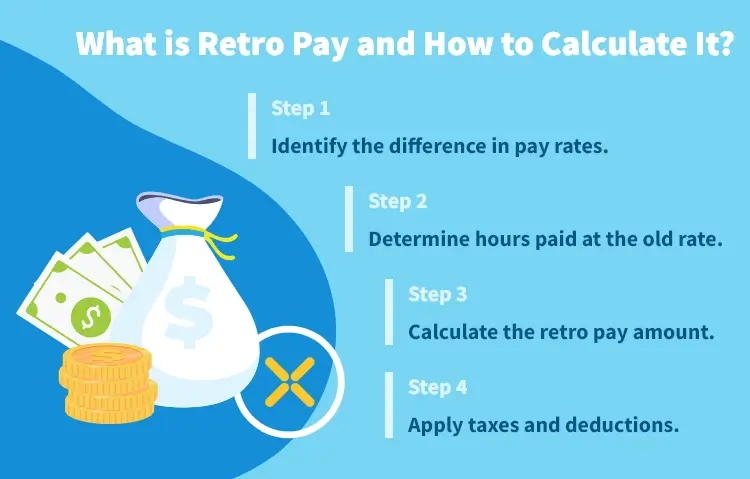
Start by subtracting the old pay rate from the new one. For hourly employees, this means the new hourly rate minus the previous one. For salaried employees, compare the previous annual salary to the updated one, then break it down per pay period. This step shows the gap per unit of time worked.
Next, look at the number of hours or pay periods affected. Check payroll records for the total hours worked during the prior pay period or how many pay periods were impacted. If the employee worked overtime, include those overtime hours too, as they might affect the calculation.
Accurate employee records can be supported by Reporting for detailed payroll-related reports.
Multiply the difference from step one by the hours or periods from step two. This gives the raw retro pay before taxes.
For example, if the difference is $2 per hour and 100 hours were at the old rate, the retro pay is $200. Add this to the employee's paycheck as supplemental income.
Employers can also use Merit Modeling to manage pay increases and avoid delayed raise updates that cause retroactive payment.
Finally, treat the retro pay as regular pay for tax withholdings. Retro pay taxed includes Social Security, Medicare, and local taxes. It might push the employee into a higher tax bracket if paid as a separate payment, but it's still based on normal gross pay rules.
Example: Suppose Sarah's pay for hourly work went from $15 to $17, but the change missed the first pay period of 40 hours. Difference: $17 - $15 = $2. Retro pay: $2 x 40 = $80. This gets added to an employee's next regular paycheck.
Here are the common questions about retroactive payment:
For employees, retroactive payment on your payslip means additional earnings to correct underpayments from past pay periods, shown as a separate line item.
If you’re an employee, you’re eligible for retroactive payment if there was a payroll error, delayed pay increase, or missed payments in your employee’s pay history that resulted in you being incorrectly paid.
Retroactive payment works by calculating the difference between what you were paid and what you should have earned, then adding that amount to your next paycheck or as a lump sum. To improve employee transparency, organizations can use Total Compensation Statement.

The latest research, expert advice, and compensation best practices all in one place.
Blog
Bringing trusted compensation intelligence and seamless planning to even more ADP users.

Blog
Learn how to train managers for effective pay conversations and build trust.

Blog
Total rewards package flexibility lets employees choose what matters - pay, perks, and benefits tailored to their needs.